> ## Documentation Index
> Fetch the complete documentation index at: https://docs.shipthing.com/llms.txt
> Use this file to discover all available pages before exploring further.
# 速率限制
> 保护您的API路由免受滥用
现代应用需要速率限制来防止滥用、高效管理资源并实现分层的API访问。没有速率限制,您的应用容易受到暴力攻击、爬取和因过度使用导致的服务中断。
ShipThing有一个`rate-limit`包,由[`@upstash/ratelimit`](https://github.com/upstash/ratelimit-js)提供支持,这是一个专为无服务器和边缘环境设计的无连接(基于HTTP)的速率限制库。
## 设置
当存在`UPSTASH_REDIS_REST_URL`和`UPSTASH_REDIS_REST_TOKEN`环境变量时,`web`包的联系表单会自动启用速率限制。如果启用,联系表单将限制每个IP地址每天只能发送1个请求。
要获取您的环境变量,您可以在[Upstash控制台](https://console.upstash.com)注册并创建一个Redis KV数据库。然后您可以在数据库详情页面找到REST URL和REST token。
然后您可以将这些环境变量粘贴到每个[环境变量](/zh/env)文件中。
## 添加速率限制
您可以使用 `createRateLimiter` 函数为您的 API 路由添加速率限制。例如,要将每个 IP 地址的 AI 请求数限制为每 10 秒 10 个,可以这样做:
```ts apps/app/api/chat/route.ts theme={"system"}
import { currentUser } from '@repo/auth/server';
import { createRateLimiter, slidingWindow } from '@repo/rate-limit';
export const GET = async (request: NextRequest) => {
const user = await currentUser();
const rateLimiter = createRateLimiter({
limiter: slidingWindow(10, '10 s'),
});
const { success } = await rateLimiter.limit(`ai_${user?.id}`);
if (!success) {
return new Response(
JSON.stringify({ error: "Too many requests" }),
{ status: 429 }
);
}
};
```
## 配置
`rate-limit`包连接到[Upstash Redis](https://upstash.com/docs/redis/overall/getstarted)数据库,并自动限制对您API路由的请求数量。
默认的速率限制配置允许每个标识符每10秒10个请求。`@upstash/ratelimit`还有其他速率限制算法,例如:
* 固定窗口
* 滑动窗口
* 令牌桶
您可以在[Upstash文档](https://upstash.com/docs/redis/sdks/ratelimit-ts/algorithms)中了解更多关于不同速率限制策略和其他功能的信息。
```ts packages/rate-limit/index.ts theme={"system"}
export const ratelimit = new Ratelimit({
redis,
limiter: Ratelimit.slidingWindow(10, "10 s"),
prefix: "ShipThing",
})
```
## 使用方法
通过从 `rate-limit` 包中导入,您可以在任何 API 路由中使用速率限制。例如:
```typescript apps/api/app/ratelimit/upstash/route.ts {7} theme={"system"}
import { ratelimit } from "@repo/rate-limit";
export const GET = async (request: NextRequest) => {
// Use any identifier like username, API key, or IP address
const identifier = "your-identifier";
const { success, limit, remaining } = await ratelimit.limit(identifier);
if (!success) {
return new Response(
JSON.stringify({ error: "Too many requests" }),
{ status: 429 }
);
}
// Continue with your API logic
};
```
## 分析
Upstash Ratelimit 通过 [Upstash 控制台](https://console.upstash.com)上的仪表板提供内置分析功能。 启用后,Upstash 会收集以下信息:
* 每小时请求模式
* 标识符使用情况
* 成功率和失败率
要为您的速率限制启用分析功能,请将 "分析 "配置传递给速率限制客户端:
```typescript packages/security/index.ts theme={"system"}
export const ratelimit = new Ratelimit({
redis,
limiter: Ratelimit.slidingWindow(10, "10 s"),
prefix: "ShipThing",
analytics: true, // Enable Upstash analytics
})
```
### 仪表板
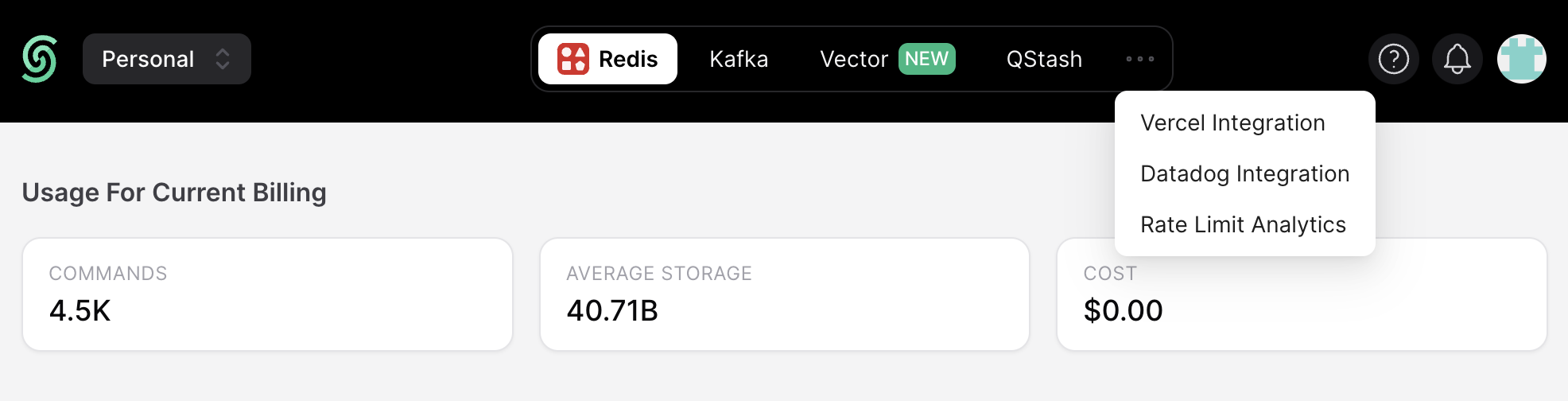
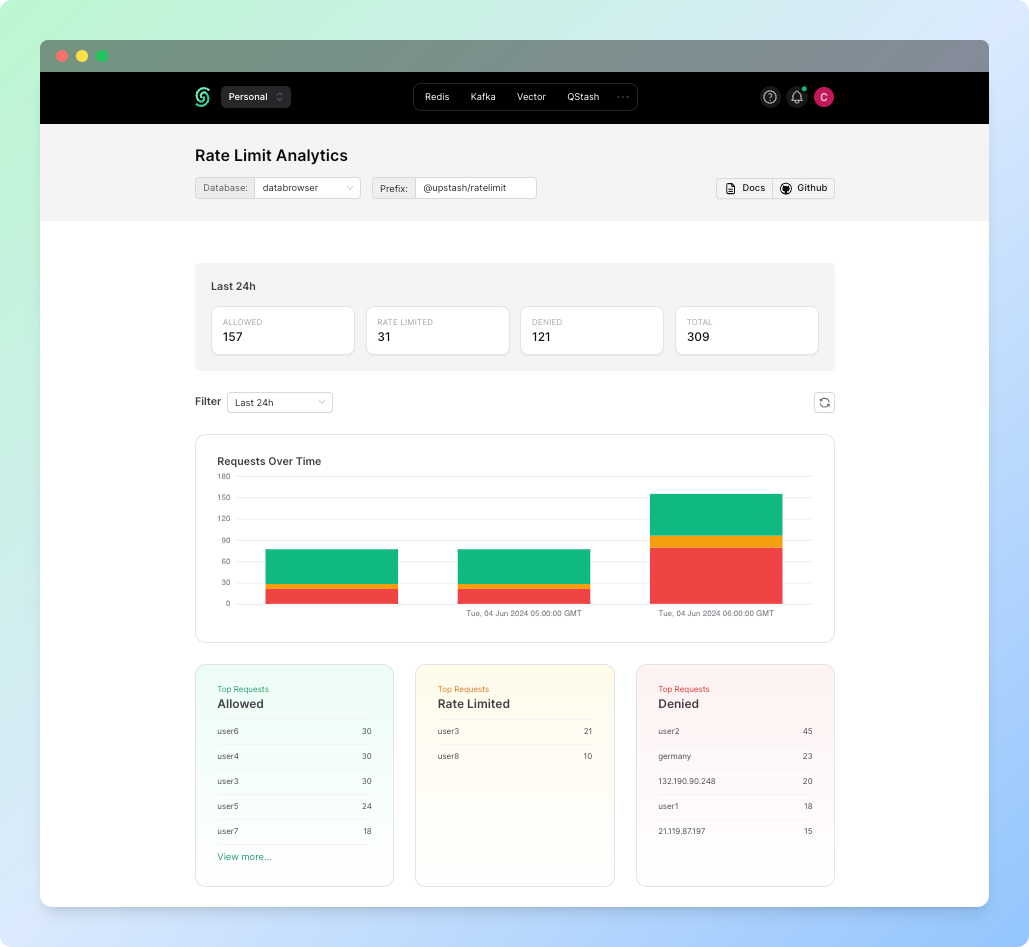
如果启用了分析功能,则可以从[Upstash 控制台中的速率限制仪表板](https://console.upstash.com/ratelimit) 中找到有关使用哪些标识符发出了多少请求以及有多少请求被阻止的信息。
要进入仪表板,只需单击三个圆点,然后选择 **费率限制分析** 标签:
 在仪表板中,您可以找到关于接受了多少申请、阻止了多少申请以及总共收到了多少申请的信息。此外,您还可以查看随时间变化的请求;允许的最高请求、限制的最高请求和拒绝的最高请求。
 ## 最佳实践
使用有意义的标识符进行速率限制,例如:
* 用户ID用于认证请求
* API密钥用于外部集成
* IP地址用于公共端点
在设置限制时考虑您的应用需求和资源。开始时保守一些,然后根据使用模式进行调整。
当超过速率限制时,始终返回适当的错误响应。如果可能,包含有关限制何时重置的信息。
使用分析功能监控速率限制命中情况,并根据实际使用模式调整限制。
## 更多信息
`@upstash/ratelimit`还提供了一些高级功能:
* **缓存**:使用内存缓存减少对已阻止标识符的Redis调用
* **自定义超时**:配置请求超时行为
* **多重限制**:根据用户层级应用不同的速率限制
* **自定义速率**:根据批量大小或请求权重调整速率限制
* **多区域支持**:为全球应用在多个Redis实例间分配速率限制
有关这些功能及其实现的详细信息,请参阅[Upstash Ratelimit文档](https://upstash.com/docs/redis/sdks/ratelimit-ts/overview)。
## 最佳实践
使用有意义的标识符进行速率限制,例如:
* 用户ID用于认证请求
* API密钥用于外部集成
* IP地址用于公共端点
在设置限制时考虑您的应用需求和资源。开始时保守一些,然后根据使用模式进行调整。
当超过速率限制时,始终返回适当的错误响应。如果可能,包含有关限制何时重置的信息。
使用分析功能监控速率限制命中情况,并根据实际使用模式调整限制。
## 更多信息
`@upstash/ratelimit`还提供了一些高级功能:
* **缓存**:使用内存缓存减少对已阻止标识符的Redis调用
* **自定义超时**:配置请求超时行为
* **多重限制**:根据用户层级应用不同的速率限制
* **自定义速率**:根据批量大小或请求权重调整速率限制
* **多区域支持**:为全球应用在多个Redis实例间分配速率限制
有关这些功能及其实现的详细信息,请参阅[Upstash Ratelimit文档](https://upstash.com/docs/redis/sdks/ratelimit-ts/overview)。