> ## Documentation Index
> Fetch the complete documentation index at: https://docs.shipthing.com/llms.txt
> Use this file to discover all available pages before exploring further.
# Vercel
> How to deploy ShipThing to Vercel.
This guide will show you how to deploy your ShipThing application to [Vercel](https://vercel.com/).
Read further deployment guides on our blog:
## Deploying to Vercel
Vercel is the easiest way to deploy Next.js apps. It's the company behind Next.js and has first-class support for Next.js.
## Setup vercel account
To host your project on Vercel you first have to [create an account](https://vercel.com/signup).
## Connect your git repository
After signing up you will be promted to import a git repository. Select the git provider of your project and connect your git account with Vercel.
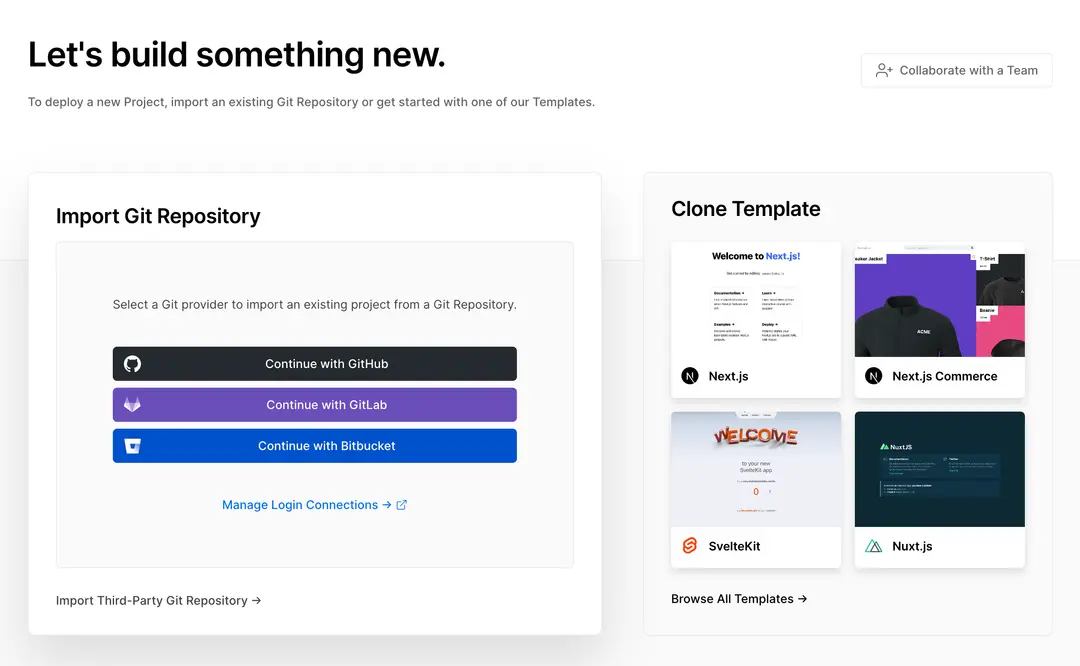 Now you will see a list of all your projects. Select the project you want to deploy and click on the **Import** button.
Then click the Deploy button and your **project** will be deployed.
## Environment variables
If you're deploying on Vercel, we recommend making use of the [Team Environment Variables](https://vercel.com/docs/concepts/projects/environment-variables#team-environment-variables) feature.
## Integrations
We also recommend installing the [BetterStack](https://vercel.com/integrations/betterstack) and [Sentry](https://vercel.com/integrations/sentry) integrations. This will take care of the relevant [environment variables](/env).
Now you will see a list of all your projects. Select the project you want to deploy and click on the **Import** button.
Then click the Deploy button and your **project** will be deployed.
## Environment variables
If you're deploying on Vercel, we recommend making use of the [Team Environment Variables](https://vercel.com/docs/concepts/projects/environment-variables#team-environment-variables) feature.
## Integrations
We also recommend installing the [BetterStack](https://vercel.com/integrations/betterstack) and [Sentry](https://vercel.com/integrations/sentry) integrations. This will take care of the relevant [environment variables](/env).